Firmware security is more important than ever in today’s connected power infrastructure. Whether you manage a small server room or a large enterprise data center, keeping your UPS (Uninterruptible Power Supply) and PDU (Power Distribution Unit) Network Management Cards updated is essential for cybersecurity, reliability, and performance.
However, manually updating dozens or hundreds of devices can be time-consuming, error-prone, and risky.
That’s where the SNS Tool comes in.
Designed to simplify firmware deployment while improving security, the SNS Tool provides IT administrators and facility managers with a centralized way to update Network Management Cards quickly, consistently, and safely.
In this guide, we’ll explore everything you need to know about the SNS Tool, including its features, benefits, supported devices, update process, and best practices.
Table of Contents
What Is the SNS Tool?
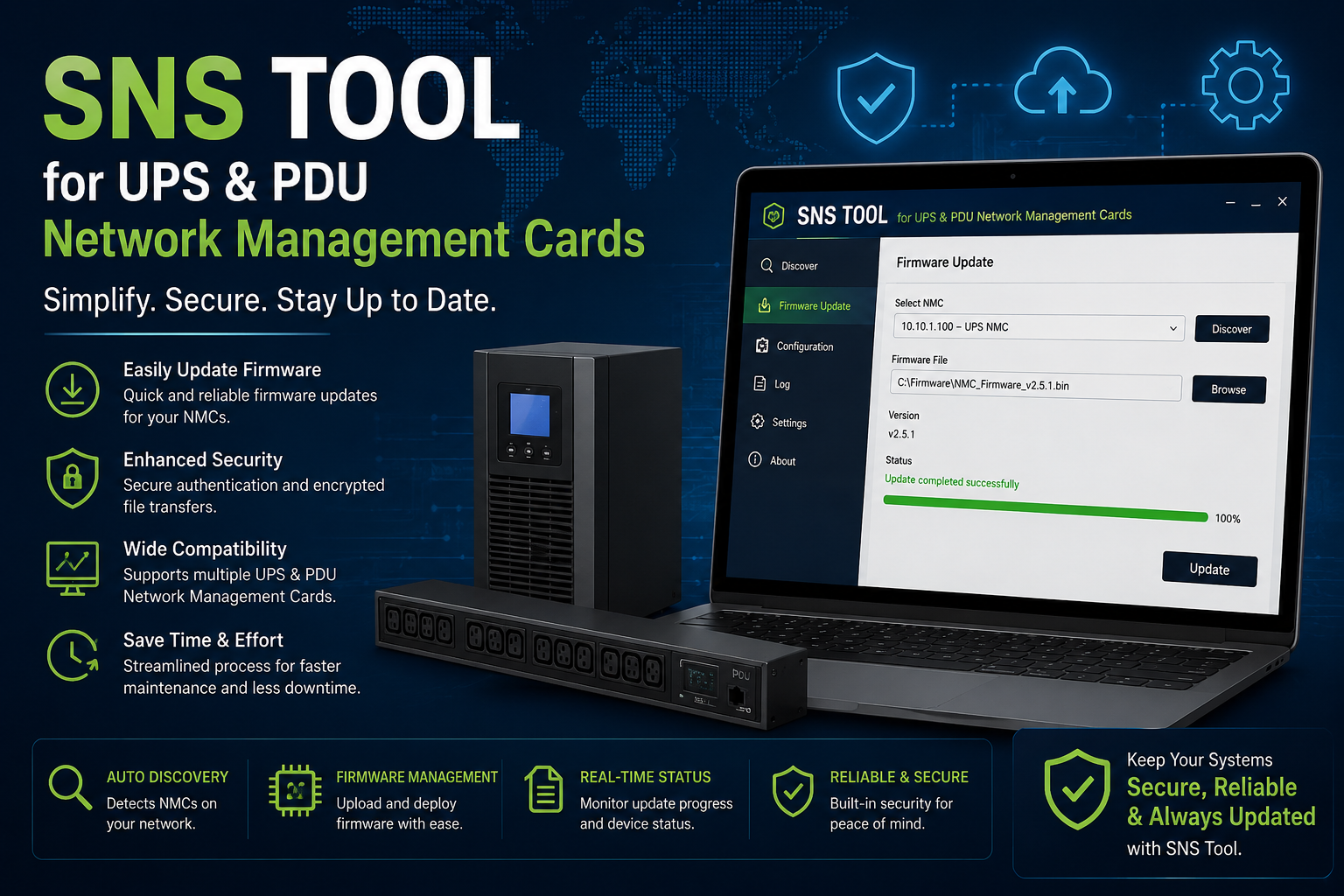
The SNS Tool is a firmware management utility developed to streamline firmware upgrades for Network Management Cards installed in UPS and PDU devices.
Instead of updating every device individually, administrators can manage firmware updates from a single interface, significantly reducing maintenance time and minimizing operational risks.
The tool is particularly useful for organizations operating:
- Enterprise data centers
- Industrial automation facilities
- Manufacturing plants
- Hospitals
- Banking infrastructure
- Telecom networks
- Government facilities
- Cloud computing environments
Why Firmware Updates Matter
Many organizations delay firmware upgrades until a problem occurs.
This approach increases the risk of:
- Cybersecurity vulnerabilities
- Network attacks
- Device instability
- Communication failures
- Unexpected downtime
- Compatibility issues
- Reduced equipment lifespan
Regular firmware updates ensure your critical power infrastructure remains secure and reliable.
Key Features of the SNS Tool
1. Centralized Firmware Management
Manage multiple Network Management Cards from a single application.
Benefits include:
- No manual updates device-by-device
- Faster deployment
- Better control
- Simplified administration
2. Secure Firmware Verification
The SNS Tool validates firmware packages before installation.
This helps prevent:
- Corrupted firmware
- Unauthorized modifications
- Installation failures
3. Batch Firmware Updates
One of the biggest advantages is the ability to update multiple devices simultaneously.
Perfect for organizations managing:
- Hundreds of UPS units
- Large PDU deployments
- Multiple facilities
4. Network Discovery
Automatically detects compatible devices connected to the network.
This eliminates manual IP entry and saves valuable engineering time.
5. Progress Monitoring
Administrators can monitor:
- Current firmware version
- Update progress
- Successful installations
- Failed updates
- Device status
6. Improved Cybersecurity
Firmware updates often include:
- Security patches
- Vulnerability fixes
- Authentication improvements
- Encryption enhancements
Keeping firmware current significantly reduces cybersecurity risks.
7. Reduced Downtime
With automated deployment, maintenance windows become shorter and easier to schedule.
Organizations experience:
- Less operational disruption
- Faster recovery
- Improved availability
Benefits of Using the SNS Tool
Using the SNS Tool offers several advantages:
Faster Maintenance
Update multiple devices in minutes instead of hours.
Better Device Security
Protects UPS and PDU Network Management Cards against newly discovered vulnerabilities.
Simplified Asset Management
Track firmware versions across all deployed devices.
Improved Reliability
Firmware fixes often improve:
- Device stability
- SNMP communication
- Web interface performance
- Network connectivity
Reduced Human Error
Automation minimizes mistakes caused by manual firmware installation.
Typical Firmware Update Workflow
A typical firmware upgrade using the SNS Tool includes the following steps:
Step 1
Launch the SNS Tool.
Step 2
Discover available UPS and PDU Network Management Cards.
Step 3
Select the devices to update.
Step 4
Choose the approved firmware package.
Step 5
Validate firmware integrity.
Step 6
Deploy firmware updates.
Step 7
Monitor installation status.
Step 8
Verify successful completion.
Best Practices Before Updating Firmware
Always follow these recommendations:
- Backup device configuration
- Verify firmware compatibility
- Schedule maintenance windows
- Ensure stable network connectivity
- Avoid power interruptions
- Review firmware release notes
- Test updates on a small group of devices first
Common Challenges Solved by the SNS Tool
Without centralized management, administrators often face:
- Manual firmware installation
- Inconsistent firmware versions
- Missed security updates
- Long maintenance windows
- Difficult device tracking
The SNS Tool addresses these challenges by automating much of the firmware management process.
Industries That Benefit Most
The SNS Tool is ideal for organizations managing critical infrastructure.
These include:
- Data centers
- Healthcare facilities
- Financial institutions
- Industrial automation
- Smart manufacturing
- Educational campuses
- Airports
- Telecommunications
- Energy and utilities
Security Advantages
Modern cyber threats increasingly target infrastructure devices.
Using updated firmware helps protect against:
- Unauthorized access
- Remote exploits
- Authentication weaknesses
- Network vulnerabilities
- Software bugs
Regular firmware maintenance is an essential part of any cybersecurity strategy.
Tips for Successful Firmware Management
To maximize reliability:
- Keep an inventory of firmware versions.
- Standardize firmware across similar devices.
- Maintain update logs.
- Schedule periodic firmware reviews.
- Monitor vendor security advisories.
- Train maintenance personnel on update procedures.
Frequently Asked Questions (FAQ)
What is the SNS Tool?
The SNS Tool is a firmware management utility that simplifies secure firmware updates for UPS and PDU Network Management Cards.
Is the SNS Tool suitable for enterprise environments?
Yes. It is designed to efficiently manage firmware across multiple devices in enterprise and data center environments.
Why should I update Network Management Card firmware?
Firmware updates improve cybersecurity, fix software bugs, enhance reliability, and ensure compatibility with modern network infrastructure.
Can the SNS Tool update multiple devices simultaneously?
Yes. One of its primary advantages is batch firmware deployment, allowing administrators to update many devices at once.
Does updating firmware require downtime?
Some updates may require a reboot of the Network Management Card. Plan updates during scheduled maintenance windows to minimize operational impact.
Final Thoughts
As organizations continue to modernize their IT and power infrastructure, maintaining secure and up-to-date Network Management Cards has become a critical operational requirement.
The SNS Tool simplifies this process by providing centralized, secure, and efficient firmware management for UPS and PDU devices. By automating updates, reducing manual effort, and improving cybersecurity, it helps organizations maintain reliable power infrastructure while minimizing maintenance time and operational risks.
Whether you’re responsible for a single server room or a large enterprise data center, adopting a structured firmware management strategy with the SNS Tool can significantly improve the security, stability, and performance of your critical power systems.