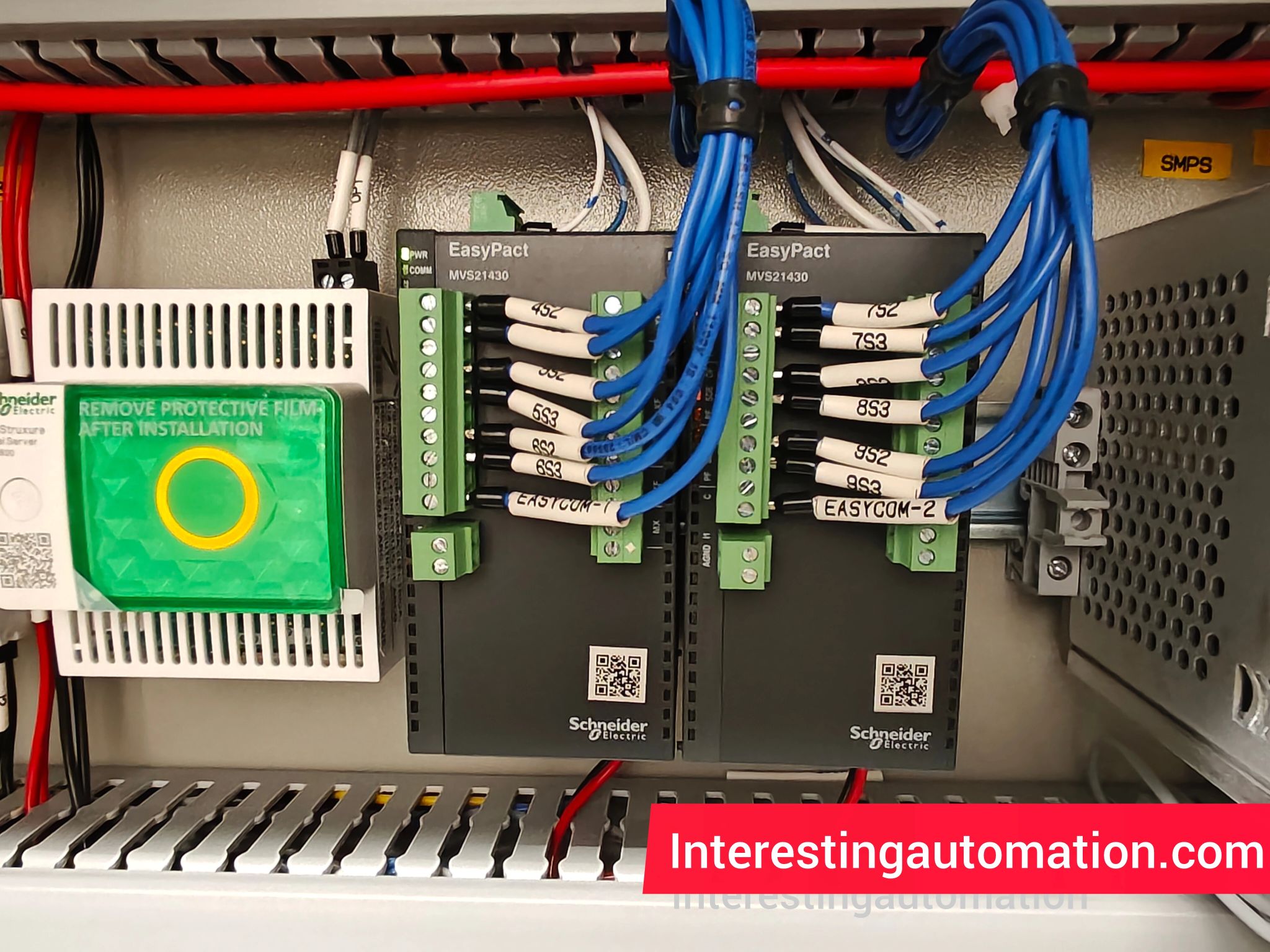
” Explore the Schneider EasyCom Communication Module for EasyPact MVS – a powerful Modbus-based solution that enhances circuit breaker connectivity, remote monitoring, and smart energy management. “
1. Introduction
In the modern era of digital power distribution, intelligent communication is the foundation of efficient, reliable, and sustainable energy systems. Industries today demand real-time data, remote control, and predictive analytics to optimize performance and reduce downtime.
Enter the Schneider EasyCom Communication Module for EasyPact MVS – a compact yet powerful solution designed to bring smart communication and monitoring capabilities to Schneider’s EasyPact MVS circuit breakers.
Whether you are managing an industrial facility, commercial building, or infrastructure project, the EasyCom module bridges the gap between traditional electrical protection and intelligent digital control.
2. What is the Schneider EasyCom Communication Module?
The Schneider EasyCom Communication Module is a dedicated interface device that connects EasyPact MVS circuit breakers to supervisory systems such as SCADA, PLC, or Building Management Systems (BMS).
It uses the Modbus RTU protocol over an RS485 network, allowing real-time exchange of critical data like breaker status, current, voltage, trip conditions, and energy consumption.
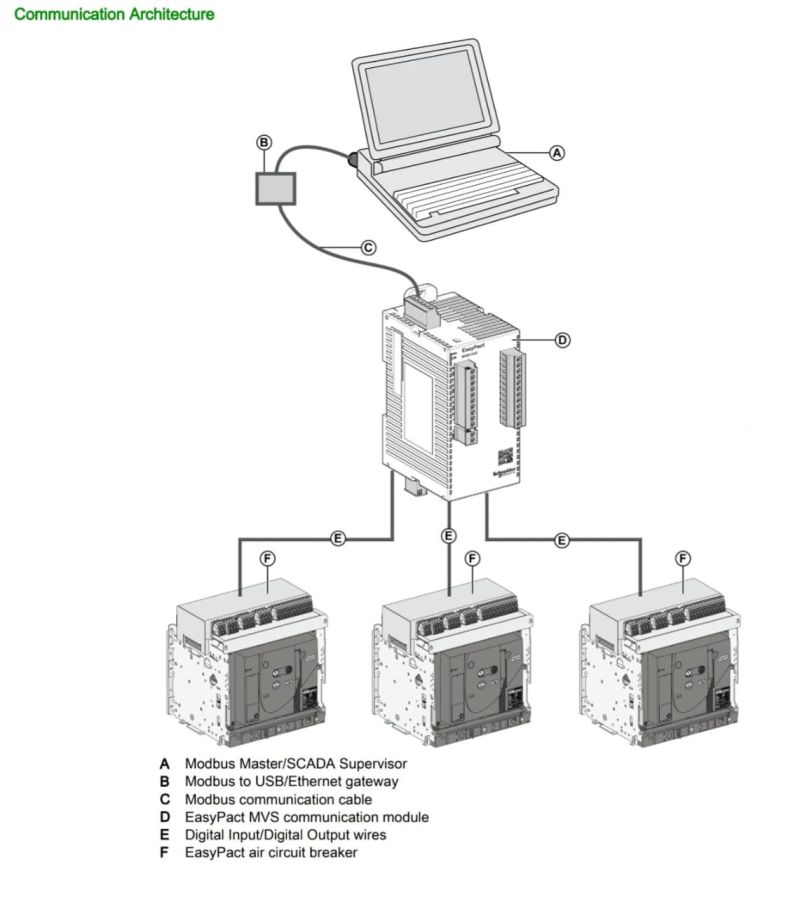
This smart add-on transforms a simple circuit breaker into a digitally enabled monitoring unit, allowing remote supervision and efficient energy management through Schneider Electric’s EcoStruxure Power platform.
3. Why Communication Modules Matter in Power Systems
In a traditional electrical system, circuit breakers operate independently, providing basic protection against overloads or short circuits. However, in digital power systems, data and communication are key to predictive maintenance and operational efficiency.
With a communication module like EasyCom, you can:
- Access real-time electrical parameters remotely.
- Detect and troubleshoot faults faster.
- Record energy consumption trends for optimization.
- Integrate your system with smart building and industrial automation software.
In short, the EasyCom module helps turn your switchgear into a connected, intelligent, and energy-efficient system.
4. Key Features of Schneider EasyCom Communication Module
4.1. Modbus RTU Connectivity
- The EasyCom module supports Modbus RTU protocol, one of the most widely used communication standards in industrial environments.
- Operates on an RS485 interface, ensuring long-distance communication up to 1200 meters with high noise immunity.
- Enables smooth integration with third-party devices, SCADA systems, and PLCs.
4.2. Real-Time Data Access
- Provides instant information on circuit breaker conditions: ON/OFF, tripped, or ready.
- Displays load current, voltage, trip cause, and thermal status.
- Facilitates predictive maintenance by identifying abnormal load behavior.
4.3. Plug-and-Play Installation
- Specially designed for EasyPact MVS circuit breakers.
- Quick mounting and configuration with minimal wiring effort.
- LED indicators for communication and operational status.
4.4. Integration with EcoStruxure
- Fully compatible with Schneider Electric’s EcoStruxure Power Monitoring Expert (PME) software.
- Collects and visualizes data through dashboards for energy analytics and reporting.
- Simplifies energy audits and compliance with ISO 50001 energy standards.
4.5. Rugged and Reliable Design
- Built for harsh industrial environments.
- Operates reliably across wide temperature and humidity ranges.
- Resistant to electrical noise and vibration.
5. Technical Specifications
| Parameter | Specification |
|---|---|
| Compatible Devices | EasyPact MVS Circuit Breakers |
| Communication Protocol | Modbus RTU |
| Interface Type | RS485 |
| Baud Rate | Up to 115.2 kbps |
| Address Range | 1 to 247 |
| Power Supply | 24V DC |
| Mounting Type | Plug-in |
| Operating Temperature | -25°C to +70°C |
| Indicators | Communication and Status LEDs |
| Compatibility | EcoStruxure Power, PME, SCADA, PLC |
6. Benefits of Schneider EasyCom Communication Module
6.1. Smart Energy Management
The module provides accurate energy and load data, helping facility managers analyze and reduce energy waste. Over time, this translates into substantial cost savings and better sustainability.
6.2. Enhanced Safety
With remote breaker monitoring and control, operators can safely isolate faulty circuits without physically accessing high-voltage equipment.
6.3. Predictive Maintenance
The EasyCom module helps detect overload patterns and trip histories, enabling predictive maintenance before system failures occur.
6.4. Reduced Downtime
Fast fault diagnosis and automatic alerts minimize downtime, improving operational continuity.
6.5. Seamless Integration
Compatible with Modbus-based systems, it can communicate with PLCs, energy analyzers, and monitoring software for a unified control system.
7. Applications of EasyCom Communication Module
The Schneider EasyCom module is versatile and can be deployed in various sectors:
- Industrial Power Distribution Panels
– For process automation and load monitoring in manufacturing plants. - Commercial Buildings and Data Centers
– Enables efficient facility management and energy tracking. - Renewable Energy Systems
– Integrates solar or wind generation panels into centralized monitoring systems. - Infrastructure and Utilities
– Ideal for smart grid and substation automation. - OEM Equipment and Machinery
– Adds communication capability to electrical protection systems.
8. Installation and Configuration Guide
Step 1: Mounting the Module
- Connect the EasyCom module directly onto the communication interface of the EasyPact MVS circuit breaker.
- Ensure the connection is secure and properly aligned.
Step 2: Wiring the RS485 Network
- Use a twisted pair shielded cable for RS485 connections.
- Connect terminals A(+), B(-), and GND in a daisy-chain configuration.
- Use termination resistors (120Ω) at both ends for signal stability.
Step 3: Setting Communication Parameters
- Configure Modbus address, baud rate, and parity using DIP switches or Schneider’s setup tool.
- Default settings: 9600 bps, 8N1.
Step 4: Integrating with SCADA/PLC
- Add the device in your SCADA or PLC configuration using its Modbus address.
- Map relevant Modbus registers for breaker data and control.
Step 5: Testing and Validation
- Verify communication via LED indicators.
- Test real-time data visualization in the software dashboard.
9. Comparison: EasyCom vs. Other Schneider Communication Modules
| Feature | EasyCom for EasyPact MVS | Micrologic for Masterpact MTZ | IFE Interface for Compact NSX |
|---|---|---|---|
| Target Device | EasyPact MVS | Masterpact MTZ | Compact NSX |
| Communication Protocol | Modbus RTU | Modbus TCP/IP, Ethernet | Modbus TCP/IP, Web Server |
| Interface | RS485 | Ethernet | Ethernet |
| Integration Level | Basic to Intermediate | Advanced | Intermediate |
| Energy Metering | Supported | Built-in | Supported |
| Best For | Basic connectivity and monitoring | Smart energy analytics and IoT | Ethernet-based energy management |
Summary:
The EasyCom module is ideal for applications needing RS485 Modbus communication at an affordable cost. For advanced IoT-based solutions, users may upgrade to IFE or Micrologic modules offering Ethernet and cloud connectivity.
10. Troubleshooting Tips
| Issue | Possible Cause | Solution |
|---|---|---|
| No communication | Wrong RS485 wiring | Check polarity and grounding |
| Device not visible on network | Address conflict | Assign unique Modbus address |
| Data errors | Baud rate mismatch | Match communication settings in all devices |
| LED not blinking | No power supply | Verify 24V DC input |
11. FAQs about Schneider EasyCom Communication Module
Q1. What is the main function of the EasyCom module?
The EasyCom module enables Modbus communication between EasyPact MVS circuit breakers and supervisory systems for real-time monitoring and control.
Q2. Is it compatible with all Schneider circuit breakers?
No. It is specifically designed for EasyPact MVS series. For Compact NSX or Masterpact MTZ, other communication modules like IFE or Micrologic are used.
Q3. What protocol does the EasyCom module use?
It uses Modbus RTU over an RS485 network.
Q4. Can I use it with third-party SCADA systems?
Yes. As long as the SCADA supports Modbus RTU, it will work seamlessly.
Q5. Does it support remote tripping?
Yes, depending on system configuration, remote ON/OFF and trip reset are possible.
Q6. What software can I use for monitoring?
You can use EcoStruxure Power Monitoring Expert (PME) or other Modbus-compatible applications.
12. Real-World Use Case Example
A manufacturing plant in Pune, India, implemented EasyPact MVS breakers with EasyCom modules across its distribution panels.
After integration with a SCADA system, the facility achieved:
- 25% reduction in unplanned downtime due to early fault detection.
- 15% improvement in energy efficiency through real-time load monitoring.
- Enhanced safety with remote breaker operation and alarm notifications.
This case proves how even small upgrades can deliver big results in smart energy management.
13. Why Choose Schneider Electric
Schneider Electric is a global leader in energy management and industrial automation, trusted in over 100 countries. With a focus on innovation, sustainability, and reliability, Schneider continues to revolutionize digital energy solutions.
The EasyCom Communication Module is part of Schneider’s EcoStruxure architecture, designed to make energy safe, reliable, efficient, and sustainable for everyone.
14. Pros and Cons
Pros:
✅ Easy integration with EasyPact MVS breakers
✅ Reliable Modbus RTU communication
✅ Real-time data visibility
✅ Compact design and simple setup
✅ Compatible with EcoStruxure Power software
Cons:
⚠️ Limited to Modbus RTU (no Ethernet option)
⚠️ Designed only for EasyPact MVS series
⚠️ Requires external 24V DC power supply
15. Conclusion
The Schneider EasyCom Communication Module for EasyPact MVS is a perfect example of how simplicity meets intelligence in modern power systems. By enabling smart communication and remote monitoring, it helps industries achieve higher efficiency, safety, and control.
If you are looking to upgrade your EasyPact MVS circuit breakers with advanced connectivity, the EasyCom module is your ideal choice — reliable, cost-effective, and future-ready.