Industrial data tools can look alike until you ask them to do a hard job. A Historian vs Edge Gateway comparison gets confusing because both can collect plant data, clean it up, and send it onward.
The split shows up when you look at time, storage, and output. If you’re choosing tools for a line, a plant, or a cloud project, it helps to know what they share, where they part ways, and when a hybrid approach makes sense.
Table of Contents
What historians and edge gateways have in common
A historian and an edge gateway often start with the same chores. Both have to reach into the plant, pull in raw data, and turn that data into something another system can trust.
Ingestion starts the whole chain
Nothing happens without data access. Both tools need to ingest data, and that means far more than PLC tags.
A plant may pull values from UPS units, power meters, hydraulic systems, pneumatic systems, and network switches. Battery status, power use, air pressure, and switch health can all matter because each one can affect uptime or process quality. If a switch port starts showing errors, messages may still pass, but the trouble is already there.
That broader view matters because plants rarely run on PLC data alone. The useful story often lives across the whole network.
Preprocessing turns raw signals into useful data
Raw values are often messy. One site may report tank level in millimeters, while another uses inches and feet. Temperature can arrive in Celsius at one farm and Fahrenheit at the next.
That is why preprocessing matters. Both historians and edge gateways need to scale values, normalize units, and attach context before the data goes anywhere else. A Modbus register is a good example. If a register holds the value 52, that number means little on its own. It could be a level, a pressure, or a temperature, and it still needs units.
Once the cleanup happens, the destination system doesn’t have to guess.
Modeling and cybersecurity give the data shape and protection
After cleanup, data needs structure. If values from a UPS, a power meter, a switch, and a PLC all belong to line 7, the model should say so. That way the destination receives a coherent set of line data instead of a pile of unrelated points.
Security sits beside that work. Inside the control system, behind the plant firewall, the risk may be handled at a higher level. However, when data leaves for the enterprise or the cloud, cyber requirements move to the front. At that point, the historian or gateway has to meet the plant’s rules for outbound data.
How a historian works differently from an edge gateway
Shared plumbing makes these tools look close cousins. Their real difference shows up in how they treat collection, storage, timestamps, and outbound formats.
This quick table sets the stage:
| Aspect | Historian | Edge Gateway |
|---|---|---|
| Data collection | On a schedule or event | Continuous flow |
| Main job | Keep and organize records | Move live data |
| Time handling | Adds timestamps for later use | Passes data as it arrives |
| Common outputs | CSV, JSON, FTP | MQTT, Kafka, OPC UA |
The short version is simple: one tool keeps history, the other keeps traffic moving.
If your main question is “what happened last shift, last week, or last month,” you’re usually in historian territory.
Historians collect on a schedule, edge gateways stream all the time
A historian often works on a chosen interval or event. For a tank level, one sample per minute may be enough. In other cases, a plant may only want a record at the end of a job, the end of the day, the end of the week, or the end of the month.
That schedule gives the data context. It ties records to process events, reporting cycles, or production windows.
An edge gateway behaves differently. It keeps collecting and keeps streaming, because its main job is to move live data to enterprise or cloud systems. When downstream apps need a steady feed, constant publishing makes more sense than periodic capture.
Storage and timestamping are a historian’s home base
A historian does more than pass data along. It stores data locally so someone can come back later and ask what changed, when it changed, and what happened first.
Timestamps are part of that job. Each stored record needs a reliable time attached to it. That time may come from the local machine clock, an NTP server, or another plant time source. If clocks drift, clean analysis gets harder because events from different devices no longer line up.
That is one of the clearest lines in the Historian vs Edge Gateway discussion. A gateway may move data fast, but a historian turns that data into a usable record of the past.
Publishing looks different on each side
Both tools publish data, but they usually publish it in different ways.
A historian often publishes data that is already stored. That might be a CSV file, a JSON payload, or a file sent out over FTP. The receiving system may want the last hour, the last day, or the last week of records.
An edge gateway is built for live delivery. MQTT is a common fit. Kafka can fit too, and so can OPC UA, depending on the system on the other end. Products such as Ignition Edge show that edge-of-network model well, where the focus stays on moving current data outward.
Compression matters when data volume gets big
In large historian systems, storage volume becomes its own problem. If you are keeping hundreds of thousands, millions, or terabytes of records, compression can save a lot of disk space.
Smaller systems may not need it. In midrange or targeted applications, the data load may be modest enough that compression adds little value. That is why some historian products treat compression as a major feature, while others skip it.
Deployment choices shape cost, maintenance, and fit
The same comparison changes once you move from function to deployment. Where the tool lives, how it is managed, and who supports it can matter as much as the feature list.
Hardware and software each solve different problems
Software deployment works well when a plant already has server space or a VM ready to go. In that case, adding a historian or gateway may fit the existing stack. The tradeoff is that software often brings license fees and another system to maintain.
A hardware appliance changes that picture. You mount the box, power it up, and use it as a dedicated node on the machine or network. Some teams like that because it keeps the job separate from shared servers and avoids recurring software costs.
Neither path wins every time. The better fit depends on the plant’s habits and budget.
Choose based on location, scale, and support needs
Placement matters too. A device that stays inside the control system may have a simpler role, local collection, local storage, or both. Once the same device has to publish into the enterprise or cloud, security, output method, and support needs grow.
Existing infrastructure also shapes the answer. A plant with good virtual capacity may prefer software. A line with limited IT help may prefer dedicated hardware. John S. Rinaldi makes a related point in his short note on PLC databases and historians, where the architecture choice depends on what the data must do next.
When a hybrid historian makes the most sense
Some projects sit in the middle. They need historian behavior, but they also need gateway-style publishing.
Best for teams that want both file output and live streaming
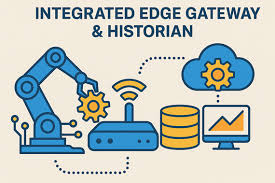
Real Time Automation describes its RTA Historian as a blend of both categories. The unit can collect at different frequencies, add timestamps, store data locally, and publish data either as files or as a live stream.
That mix can help when one group wants CSV or JSON output for reports, while another group wants live data headed upstream. A brief video explanation from Real Time Automation frames it as a practical middle ground rather than a high-end enterprise historian.
A good fit for plants that want simple setup and steady value
In the product demo, the hardware appears as a compact DIN-rail box. That style fits plants that want a direct install path and low ongoing overhead.
Real Time Automation also makes a clear boundary around the product. It is not aimed at the highest-volume historian workloads, so compression is not a focus. For plants that want local storage, timestamps, and flexible publishing without a large software rollout, that tradeoff may be perfectly reasonable.
Choose the tool by the data job
The confusion around Historian vs Edge Gateway starts because both tools share the same front-end work. They ingest data, clean it up, model it, and protect it.
The deciding factor is what happens next. If you need scheduled collection, timestamps, and stored records, a historian is usually the right fit. If you need data to keep flowing to enterprise or cloud systems, an edge gateway is the better choice. And if your plant needs both, a hybrid tool can bridge that gap without forcing a false choice.