On a factory floor, a machine operator shouldn’t have to fight a cable just to start a line or stop a press. That’s where Harmony Wireless Push Buttons and Ecosystem Explained comes in, because the button is only part of the story.
These Harmony wireless push buttons send a control signal without a wire running back to the panel, which makes them useful for retrofits, moving stations, and awkward spots where cabling slows everything down. The ecosystem matters because you also need the receiver, pairing setup, and control logic that tells the machine what to do when the button is pressed.
Once you understand how the pieces fit together, it gets easier to see why installation can be simpler, maintenance can be faster, and day-to-day use can feel cleaner on the floor. The next step is seeing how the system works, what it includes, and where it fits best.
Table of Contents
What Harmony wireless push buttons are and why they matter
Harmony wireless push buttons are industrial controls that send a signal without a hardwired connection back to the panel. They fit the same basic job as a standard push button, but they do it with a radio link and a batteryless design, which changes how they get used on the floor. That matters when you want less cable work, quicker installs, and more freedom around moving equipment.
These buttons solve a very practical problem. In many plants, the fastest path to a control point is often the hardest one to wire. A wireless button cuts that run out of the picture, which helps when you are adding a station to existing equipment or placing controls where a cable would get damaged. For a broader look at the wireless side of industrial communication, see how Zigbee supports wireless devices.
How batteryless wireless control changes daily use
Batteryless design takes a common headache off the table. There is no battery to replace, no charging schedule to track, and no spent cell to recycle after a few years of use. That means less maintenance, less downtime, and fewer surprise interruptions when a control point is needed right away.
The button is ready when the operator is ready. A quick press creates the energy needed for the signal, so the control stays simple at the point of use. In a busy work area, that kind of reliability feels small until the day a dead battery would have stopped the job.
A control that works when pressed is worth more than one that needs regular attention.
Daily use gets easier because the button acts like a tool, not a task. You install it, pair it, and get on with the work. Schneider Electric’s own product materials for Harmony push buttons and signaling devices show how this family is aimed at real plant use, where practical setup matters more than novelty.
Where these push buttons fit best
Harmony wireless push buttons fit best where wiring is costly, awkward, or likely to change. Factories use them on machinery that already runs well but needs a better control point. Retrofit projects benefit too, because you can add control without opening up long cable routes or reworking a full panel.
They also make sense on equipment that moves. A conveyor section, a gantry, a mobile cart, or a temporary work cell can all be easier to manage with wireless control. In hard-to-wire spots, such as rotating fixtures, isolated stations, or areas with limited access, the button gives operators a simple way to stay close to the machine.
Here are the places where they often fit best:
- Retrofit work: Add a control point without major rewiring.
- Moving equipment: Keep control close to the machine as it shifts position.
- Hard-to-wire areas: Avoid long cable runs across awkward layouts.
- Flexible workspaces: Reposition controls as the process changes.
The common thread is flexibility. When the layout may change, or when a cable would become a weak point, a wireless push button keeps the control point where people actually need it.
How the Harmony wireless ecosystem works together
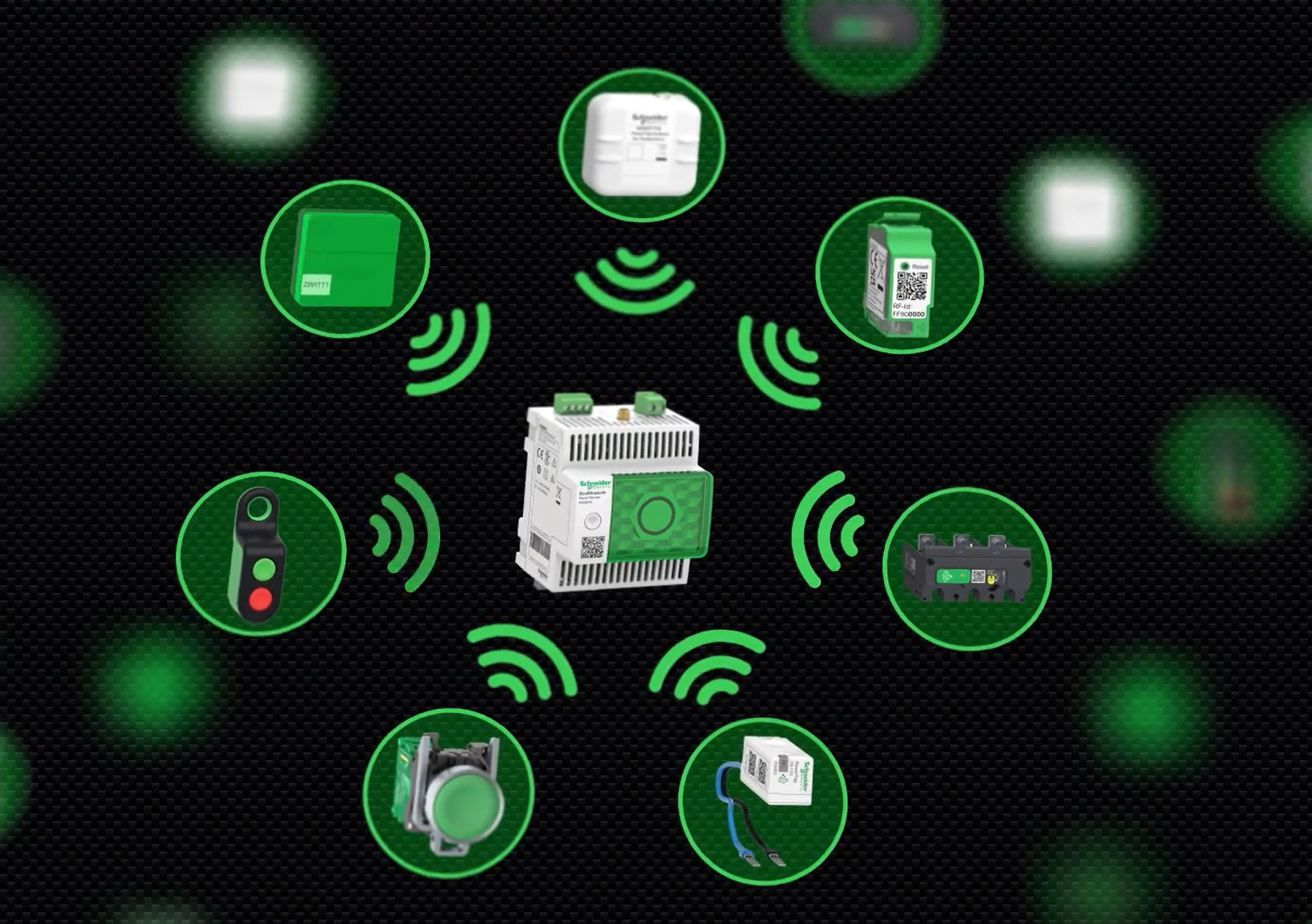
Harmony wireless push buttons work best as a set, not a single part. The button sends the command, the receiver catches it and turns it into an output, and the rest of the setup shapes how that command fits the machine. That’s why the ecosystem matters, because each piece has a clear job and the whole system feels practical on the floor.
The main pieces in the system
The wireless push button is the part the operator touches. It sends the signal without a wire running back to the panel, which keeps the control point easy to place.
The receiver sits on the machine or in the control cabinet. It listens for the button’s signal, then passes that action into the control system. In simple terms, it is the bridge between the operator’s hand and the machine’s response.
Supporting parts round out the setup. Depending on the job, that can include mounting hardware, labels, or enclosure options. Some systems also ship with packaging choices that make it easier to match the controls to the application right away. For a wider view of the product family, see Harmony push buttons and signaling devices.
Ready-to-use packs versus custom setups
A ready-to-use pack makes sense when the job is straightforward. You get a matched button and receiver, which saves time when you need a fast install or a simple replacement.
A custom setup fits better when the machine has special needs. Maybe you need a different mounting style, more than one station, or a layout that changes later. In that case, choosing the pieces separately gives you more control over the final result.
The best choice depends on the work in front of you:
- Prebuilt pack: Good for common jobs, quick installs, and repeat use.
- Custom setup: Better for unusual layouts, added stations, or future expansion.
How pairing and multi-button support help scaling
Pairing is simple enough to keep the system easy, but flexible enough to grow. The receiver learns the wireless button, then saves that link so the signal goes to the right output. Schneider Electric’s own pairing flow is built around that receiver-first setup, where the receiver learns the button and stores the match in a few steps.
That matters when one receiver needs to work with more than one push button. A line can have multiple control points without turning the system into a wiring puzzle. One machine, several stations, and room for more later, that is the real value.
The best wireless control systems grow without making the floor harder to manage.
For a practical example of how the relay side ties into Harmony control hardware, the Harmony relay product page shows how these parts fit into industrial control work.
The benefits that make wireless push buttons worth considering
Wireless push buttons earn their place when a plant needs control without the drag of extra wiring. They trim the work behind the scenes, then leave operators with a cleaner, easier-to-use control point on the floor. That mix matters because the real cost of a button is rarely the button itself. It is the labor, the cable path, the downtime, and the upkeep that follow it.
Why installation can be faster and cheaper
A wired button often brings a long checklist with it. Someone has to route cable, protect it, terminate it, test it, and document it. Wireless control removes much of that work, so installation moves faster and costs less in labor and materials.
That difference shows up even more in retrofit projects. When a machine already exists, running new cable can mean opening panels, threading conduit through tight spaces, and planning around live production. With a wireless option, the control point can go where the work happens, without turning the layout into a wiring puzzle.
For buyers comparing control options, the savings often come from three places:
- Less cable means lower material spend.
- Fewer labor hours mean shorter install windows.
- Less planning means fewer delays before startup.
In new builds, wireless control can still simplify design. In retrofits, it can remove the hardest part of the job. That is why wireless sensor installation benefits often matter in the same conversation, because the same logic applies across many industrial control points.
How operator mobility improves workflow
Wireless push buttons let people stand where the job is safest and easiest to see. An operator can move closer to the machine, step back for a wider view, or shift position as the task changes. That kind of freedom improves both comfort and control.
It also supports safer work habits. Instead of reaching across equipment or walking back to a fixed panel, the worker keeps the controls near the action. On a crowded floor, that small change can reduce awkward motions and help the operator respond faster.
The result is smoother day-to-day work. A button that follows the task is easier to live with than one that forces the task to follow the button.
What less maintenance means over time
Batteryless operation removes one of the most common upkeep jobs. There is no battery to replace, no charging cycle to track, and no dead cell to discover during a shift change. As a result, the control point stays ready without adding another item to the maintenance list.
Fewer wired parts also mean fewer points of failure. Cables can loosen, wear, or get damaged in busy areas. Wireless control cuts down those weak spots, which helps performance stay more predictable over time.
Fewer parts to manage usually means fewer interruptions to manage.
That is why many plants look at industrial wireless switch basics when they want lower upkeep and steadier uptime. The value is plain, fewer small problems, fewer surprise stops, and a control system that asks for less attention day after day.
Design details that improve safety, feedback, and reliability
A wireless push button feels simple on the surface, but the details decide how well it works on a real floor. In a factory, people need a control that answers quickly, stays clear under pressure, and keeps working in rough conditions. That is where the Harmony wireless system earns trust.
Visual feedback that confirms a press
When an operator presses a button, instant light confirmation matters. It removes doubt in the same second the hand makes contact, which builds confidence and cuts down on missed actions. In a noisy work area, a light can say “the command went through” when a sound would get lost in the machine noise.
That kind of feedback also helps people move faster without second-guessing themselves. If the button lights up right away, the operator knows the machine heard the signal. If it does not, the problem is clear before the task gets delayed.
Many industrial controls use light, sound, or machine response to confirm action. Rockwell Automation’s push buttons and signaling devices show how that feedback fits into everyday plant use, where clarity matters as much as the command itself.
Clear feedback cuts confusion before it turns into downtime.
Wireless range and signal path in real spaces
Real plants are full of walls, doors, racks, and metal surfaces. A good wireless button has to work in that environment, not just in a clean test setup. When the signal can travel through common obstacles, the operator has more freedom to place the control where it makes sense.
That means less compromise. You can keep the button near the machine, on a moving station, or on the other side of a barrier without forcing a long cable run. In practice, that flexibility helps the control point follow the work, not the other way around.
Reliability in industrial environments
Industrial control needs to work the same way every day. The Harmony ecosystem is built for machine use, so consistent response is part of the design, not an extra feature. Rugged housings, sealed construction, and hardware made for demanding spaces help the system hold up against dust, vibration, moisture, and constant use.
That matters because reliability is not just about staying on. It is about responding when pressed, shift after shift, without creating another maintenance chore. Omron’s wireless pushbutton switches show the same basic idea, industrial wireless control should feel steady, predictable, and ready for the next press.
How to choose the right Harmony wireless setup for your application
The right setup starts with the job, not the product label. A wireless button that works well on one machine can feel clumsy on another if the layout, control flow, or access needs are different.
Start by looking at how the machine is used every day. Then look at who presses the button, where they stand, and how far they need to be from the control cabinet. Once that is clear, the choice gets easier.
Match the setup to the machine and workflow
A small station with one operator needs a different setup than a long line with several control points. If the button only needs to reach a nearby receiver, a simple arrangement works well. If the operator moves around a large machine, the button should stay close to the work, not the panel.
Access matters too. Some machines are used by one trained technician, while others are shared by a whole shift. In shared spaces, clear labeling and easy placement matter because people need to know what each control does at a glance.
Distance is another practical filter. A short hop across a compact cell is easy to handle, but a wider floor layout needs more thought. Metal frames, cabinets, and moving parts can shape the signal path, so the control point should sit where it stays useful and easy to reach. For a broader look at how industrial wireless systems behave in real plants, NIST has helpful background on wireless systems in industrial environments.
Think about expansion before you buy
A setup that looks complete today may feel tight six months later. If you expect more buttons, more receivers, or another machine section, choose a path that leaves room to grow.
That planning saves time because you avoid redoing mounts, labels, and pairings later. It also keeps the control layout cleaner. A plant that grows in stages often needs a system that can scale without turning the floor into a patchwork of one-off fixes.
The cheapest setup today can become the most expensive one if it forces a rebuild later.
A good check is simple: ask whether the current setup supports the next step. If the answer is no, a larger or more flexible Harmony wireless arrangement is the safer choice.
Use cases that call for a custom build
Some jobs fit a standard kit. Others need a tailored setup because the machine layout is unusual or the control logic is more complex. That happens on multi-station equipment, mobile machinery, or systems with several access points spread across a wide area.
Custom builds also make sense when control needs are specific. You may want a different mounting style, a special operator position, or multiple buttons tied to different actions. In those cases, a fixed package can feel like a shirt that almost fits, but never quite does.
Larger systems often need extra flexibility too. If the layout changes often, or if the controls must work across mixed equipment, a custom Harmony wireless setup gives you more room to match the machine instead of forcing the machine to match the hardware. Schneider Electric’s industrial wireless remote control options show how customizable these systems can be when the application calls for more than a basic install.
Harmony wireless push buttons are more than a control on the wall or machine. They are part of a wider ecosystem that ties the button, receiver, and control logic into one practical setup.
That matters on busy floors where every cable adds work, every battery adds upkeep, and every misplaced control adds friction. With a battery-free design and flexible placement, the system gives operators a cleaner way to work and maintenance teams fewer headaches.
For retrofits, moving stations, and hard-to-wire machines, this kind of control makes clear sense. It stands out because it fits real industrial use, where simple operation and reliable response matter more than extra hardware.