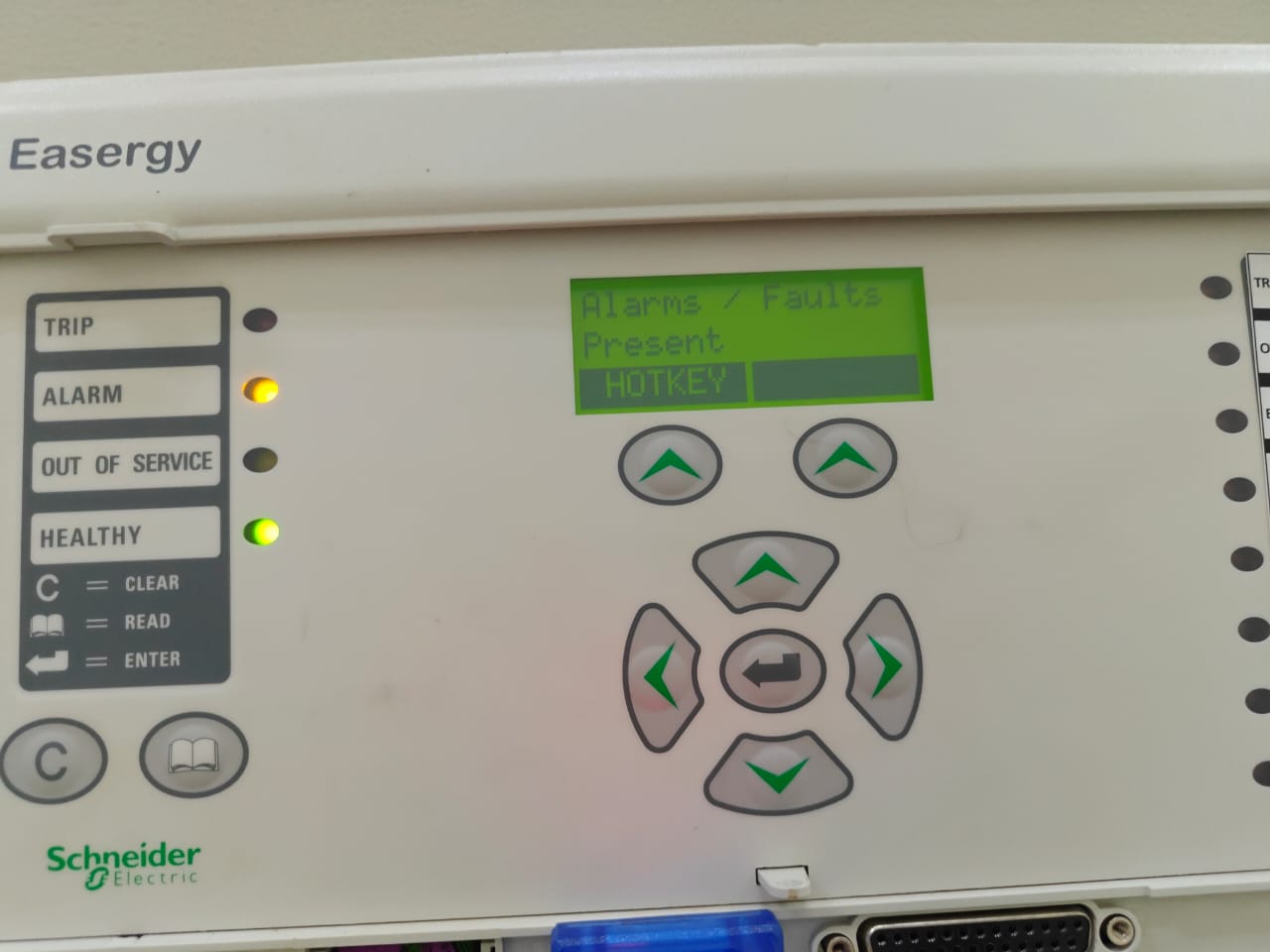
Facing a MiCOM P143 configuration error in eSergy Studio? Learn how to fix TRANSFER_ERR_BLOCKSENDFALL2, resolve IEC 61850 issues, and successfully upload settings.
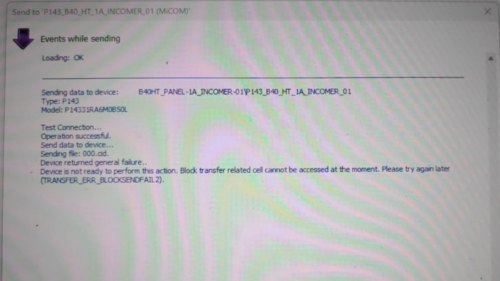
“Device is not ready to perform this action. Block transfer related cell cannot be accessed at the moment. (TRANSFER_ERR_BLOCKSENDFALL2)”
If you are seeing this error while sending data to your MiCOM P143 relay, don’t worry. This guide explains why this happens and how to fix it step by step.
Understanding the MiCOM P143 Configuration Error
When eSergy Studio attempts to send a CID or setting file to the relay, it uses a block transfer mechanism. If the relay cannot access the required memory cells or communication channels, the transfer fails.
This typically appears after messages such as:
- “Test connection… Operation successful”
- “Sending file: 000.cid”
- Followed by the error.
This means communication is established, but the relay cannot accept configuration data at that moment.
Common Causes of TRANSFER_ERR_BLOCKSENDFALL2
1️⃣ Relay Is in Run Mode
The MiCOM P143 does not allow full configuration updates while in service.
✔ Fix:
Switch the relay to Config / Out of Service mode before sending data.
Another Session Is Active
If another PC, HMI, or SCADA system is connected, the relay may block write access.
✔ Fix:
- Disconnect all other clients
- Close any active eSergy Studio sessions
- Reconnect and retry
Incorrect Firmware vs Software Version
Old versions of eSergy Studio may not support your relay’s firmware.
✔ Fix:
- Check relay firmware version
- Install the latest compatible eSergy Studio from Schneider Electric
IEC 61850 File or CID Mismatch
If the CID/SCL file structure is incompatible with the relay’s current configuration, the block transfer will fail.
✔ Fix:
- Regenerate the CID file from the IED capability file
- Ensure dataset names, logical nodes, and IP settings are valid
Communication or Port Issues
Even if the test connection passes, unstable Ethernet or wrong protocol settings may block data writing.
✔ Fix:
- Confirm correct IP address, subnet, and gateway
- Check Ethernet port configuration in the relay
- Use direct LAN connection (avoid switches if possible)
Step-by-Step Troubleshooting Guide
✅ Step 1: Put Relay in Configuration Mode
From the front panel or software:
- Set device to Out of Service / Config Mode
✅ Step 2: Restart Relay & Software
- Power cycle the MiCOM P143
- Close and reopen eSergy Studio
- Reconnect to the device
✅ Step 3: Verify Firmware Compatibility
- Check relay firmware version
- Match it with the correct eSergy Studio release
✅ Step 4: Rebuild and Re-import CID File
- Export a fresh ICD/CID file
- Validate IEC 61850 datasets and GOOSE settings
- Upload again
✅ Step 5: Check Communication Settings
- Confirm:
- IP Address
- Subnet Mask
- Port number
- Communication protocol (IEC 61850 enabled)
Why This Error Occurs in MiCOM P143
Unlike some protection relays, the MiCOM P143 has restricted memory access during live operation. When the relay is active or locked by another session, it rejects block transfers to prevent accidental configuration changes.
This safety feature ensures:
- Protection stability
- No disturbance to live feeders
- Secure IEC 61850 communication
Best Practices to Avoid Configuration Errors
✔ Always place the relay in Config Mode before editing
✔ Use the correct firmware-compatible eSergy version
✔ Keep only one active connection
✔ Backup settings before modification
✔ Validate IEC 61850 files before upload
FAQ – MiCOM P143 Configuration Transfer
❓ What does TRANSFER_ERR_BLOCKSENDFALL2 mean?
It means the relay cannot accept the configuration file because the memory block required for transfer is unavailable or locked.
❓ Can I upload settings while the relay is running?
No. The relay must be in Out of Service / Config Mode for configuration changes.
❓ Does this error indicate a faulty relay?
No. It is usually caused by mode restrictions, communication conflicts, or software mismatch.
❓ Is this problem related to IEC 61850?
Often yes. Incorrect CID files, dataset mapping, or blocked communication sessions can trigger this error.
Conclusion
The MiCOM P143 configuration error (TRANSFER_ERR_BLOCKSENDFALL2) is a common but easily fixable issue. By switching the relay to configuration mode, ensuring firmware compatibility, and validating IEC 61850 files, you can restore smooth communication between eSergy Studio and the relay.
If you regularly work with Schneider protection relays, following these best practices will save time, prevent errors, and ensure reliable substation automation.



![Voltage Sag vs Interruption: Causes, Impact, and Fixes A plant can lose a production line from a blink of power, even when the lights come back almost at once. If you've seen a VFD trip, a contactor drop out, or a PLC reset after a split-second dip, you've seen power quality turn into a production problem. The issue is often not a full outage. It's a short voltage event that sensitive equipment can't ride through. Start with the basics, and the failure starts to make sense. What voltage sag and interruption mean A voltage sag is a short drop in RMS voltage below normal, usually to 10% to 90% of rated voltage, for 0.5 cycles up to 1 minute. In a 415 V system, a brief drop to 280 V or 250 V is a sag, not a blackout. Duration matters. If voltage stays low for more than a minute, that is usually undervoltage, not sag. A sag arrives fast, recovers fast, and can still stop a machine. This quick comparison makes the difference easier to see: EventWhat happensTypical durationVoltage sagVoltage drops but does not go to zero0.5 cycles to 1 minuteVoltage interruptionVoltage is zero or near zeroLess than 1 minuteUndervoltageVoltage stays below normal for longerMore than 1 minute An interruption is more severe because supply is lost completely, or almost completely, for less than a minute. If it clears in a few seconds after auto-reclosing, it is a momentary interruption. If it stays off beyond a minute, it becomes a sustained interruption. Why these events happen The most common cause is a fault on the power system. That could be a single line-to-ground fault, line-to-line fault, double line-to-ground fault, or a three-phase fault. When fault current rises, voltage drops across the network until protection clears the problem. If the fault is on your feeder, you may see a sag first and then an interruption when the breaker opens. If the fault is on another feeder from the same substation, your breaker may never trip, but your plant can still see a bus voltage dip. That is why equipment can trip even when "our feeder never opened." Large motor starting is another frequent cause. An induction motor can draw five to seven times full-load current during start. In a weak system, or where the motor is large compared with the transformer, that inrush can create a temporary sag. Transformer energization, capacitor switching, welding loads, arc furnaces, and sudden heavy loading can do the same. Why a tiny dip can stop a large machine > The main motor may ride through a sag, but the control power often won't. Older plants had more electromechanical loads, and many of them tolerated short dips. Modern plants rely on PLCs, VFDs, servo drives, electronic power supplies, sensors, relays, and SCADA. Those devices make automation possible, but many are more sensitive to voltage dips than the motor they control. Massive steel control panels and heavy machinery dominate the floor as overhead lights cast a chaotic, flickering glow. Sharp shadows and sparks suggest a sudden surge in the facility power grid. [https://user-images.rightblogger.com/ai/f382171e-d1b1-4320-b7eb-289d9b53ee27/industrial-factory-power-instability-93e17dc7.jpg] A short sag may not stop a spinning motor because inertia keeps it moving. Still, the contactor coil can drop out, the VFD can detect undervoltage, and the PLC power supply can reset. Once the control chain breaks, the process stops. In process plants, that can mean lost batches, reset time, scrap, labor loss, and delayed delivery. Magnitude and duration both matter. Some equipment can tolerate 80% voltage for five cycles, but not 40% for the same time. That is why ride-through curves matter, and why event recording matters too. Good monitoring tools, such as monitoring power quality with PME 2024 R2 [https://www.interestingautomation.com/schneider-pme-2024-r2/], help capture minimum voltage, duration, and affected phases. Practical ways to reduce voltage sag problems The most cost-effective fix starts with the weak point. If a 200 kW machine trips because a 230 V PLC supply resets, you usually do not need to protect the whole machine. You need to protect the control power. * Specify ride-through performance when buying critical PLCs, drives, relays, and controls. * Add a small UPS, DC backup, or capacitor ride-through module for control power. * Use a voltage sag compensator or dynamic voltage restorer for sensitive process loads. * Apply online UPS systems where transfer time cannot be tolerated. * Consider motor-generator or flywheel systems where short interruptions happen often. * Use static transfer switches only when the two sources are truly independent. Source quality matters too. Utilities reduce events with better protection coordination, faster fault clearing, line maintenance, tree trimming, and feeder automation. On the plant side, grid automation and fault visibility also help, which is why tools for using Easergy T300 for fault detection [https://www.interestingautomation.com/brief-explain-easergy-t300-features-benefits-and-complete-guide/] are relevant in systems that need faster disturbance response. Final thoughts A blink in voltage can do more damage to production than a short outage, because the failure often happens inside the control system before anyone sees a breaker trip. That is the core lesson behind voltage sag and interruption studies. The best fix is rarely the biggest one. Find what actually trips, measure how deep and how long the event lasts, and protect the most sensitive part first. A brief dip should not turn into hours of downtime.](https://www.interestingautomation.com/wp-content/uploads/2026/05/Voltage-Sag-vs-Interruption-Causes-Impact-and-Fixes-150x150.jpg)