The Schneider TH110 thermal sensor is a wireless, battery-free temperature monitoring device that uses ZigBee 2.4GHz protocol for communication. Here’s a comprehensive guide on how to pair the TH110 sensor with various systems.
Understanding the TH110 Sensor
The PowerLogic TH110 is designed to harvest energy from the electromagnetic field generated by current flowing through monitored conductors, eliminating the need for batteries or external power supplies. The sensor communicates using ZigBee Green Power (ZGP) protocol and requires pairing with a compatible ZigBee concentrator or access point.
Prerequisites for Pairing
Power Requirements
- Minimum current: 0.4 A/cm of the peripheral AC live part for energy harvesting
- The sensor must be installed on an energized conductor with sufficient current flow
- For testing purposes, use at least 20A through a copper cable or busbar using a current injection kit
Compatible Equipment
The TH110 sensor can be paired with various ZigBee concentrators including:
- ZBRN32 ZigBee concentrator
- PowerTag Link HD (PTL HD) gateway
- EcoStruxure Panel Server
- Harmony Hub (for certain configurations)
Pairing Methods
Method 1: Automatic Pairing (Default Mode)
By default, the TH110 sensor is in commissioning mode and ready to be paired as soon as it’s powered on:
- Energize the sensor by ensuring adequate current flow through the monitored conductor
- The sensor automatically enters commissioning mode when first powered on
- Open the ZigBee concentrator for device discovery
- The sensor will automatically pair with any open access point within range
Method 2: Using PowerLogic Thermal Sensors Connect App
For MV switchgear and transformer applications:
- Download the PowerLogic Thermal Sensors Connect app on your mobile device
- Connect via NFC or wireless to communicate with the sensors
- Scan the installation file or download the configuration from Schneider Electric Cloud YouTube
- Configure thresholds and alarms based on sensor location
- Export configuration to NFC tag on the switchboard for future access
Method 3: Using EcoStruxure Power Commission (EPC)
For advanced configuration and monitoring:
- Create a new switchboard project in EPC software
- Add the Panel Server device via Modbus TCP connection
- Enter the IP address of the panel server and connect
- Enable automatic discovery for wireless devices
- Ensure sensors are powered on and in discovery mode
- Enter labels for each sensor and configure positions based on installation
- Configure sensor parameters, including equipment type, position, and measured point
- Apply all changes and download the JSON file for SMD configuration
Pairing Process Details
Commissioning Steps
- Prepare the installation:
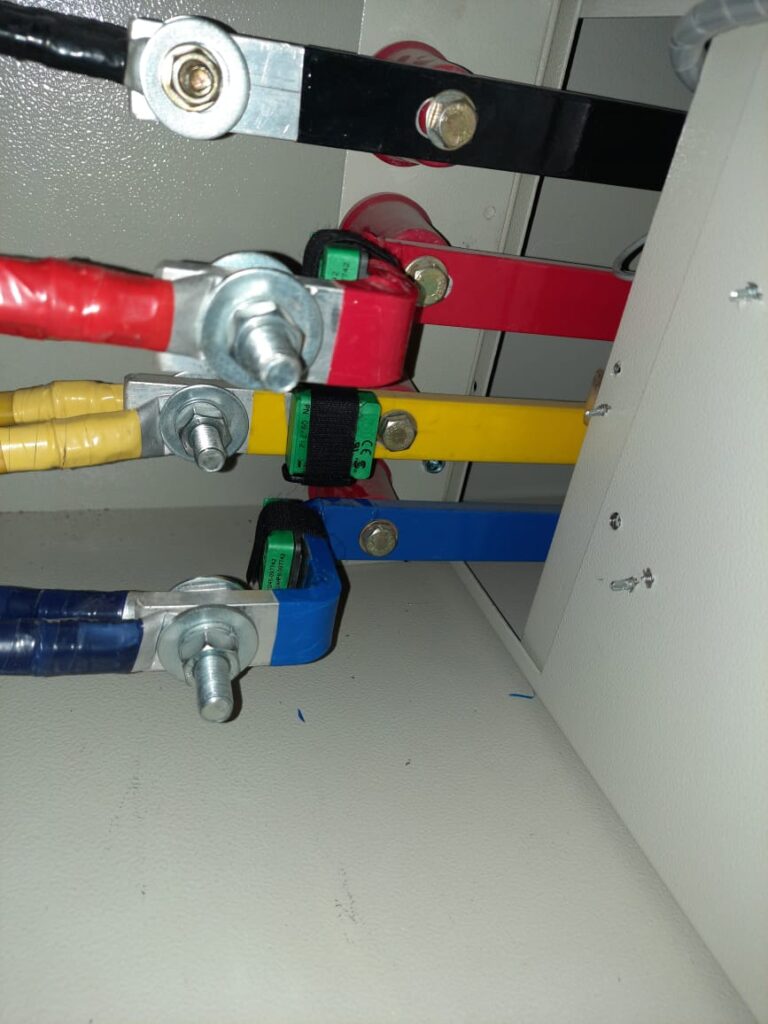
- Install sensors using ferromagnetic ribbon and self-gripping tape
- Ensure proper contact between the sensor thermistor and the measurement point
- Maintain a perimeter range of 60-300mm for monitored parts
- Security considerations:
- The security key exchange occurs only once during commissioning
- Execute commissioning in a secure environment to avoid key interception
- Only one PTL HD gateway should be in discovery mode during pairing
- Use QR codes for identification:
- Each sensor has two identical QR codes on the bottom surface
- QR codes contain the sensor’s ZigBee ID and serial number
- One QR code sticker can be detached for easy access after installation
Communication Parameters
- Transmission period: 60 seconds
- Maximum distance: 100m in free field, 25m through one metal layer, 10m through two metal layers
- Operating frequency: 2.4 GHz ZigBee Green Power
- RSSI recommendation: Around -75 dBm for optimal communication
Troubleshooting Pairing Issues
Common Problems
- Insufficient power: Ensure a minimum current of 0.4 A/cm is flowing through the conductor
- Distance limitations: Keep sensors within the recommended range of the concentrator
- Multiple gateways: Only one gateway should be in discovery mode during pairing
- Power disruptions: Use a UPS-connected current source to avoid pairing interruptions
Verification Steps
- Check RSSI levels to ensure adequate signal strength
- Verify sensor status through the concentrator interface
- Confirm proper installation with full contact between sensor and measurement point
- Use tightening tools (Phoenix Contact PN 1212610 or HellermannTyton PN MK9SST) for proper installation
Post-Pairing Configuration
After successful pairing:
- Configure alarms and thresholds based on application requirements
- Set up monitoring parameters through the chosen software platform
- Create reports and historical data logging as neededyoutube
- Export configuration to backup systems or NFC tags for future referenceyoutube
The TH110 sensor, once properly paired, will automatically reconnect to the configured gateway even after power cycling, ensuring continuous thermal monitoring of critical electrical connections.



![Voltage Sag vs Interruption: Causes, Impact, and Fixes A plant can lose a production line from a blink of power, even when the lights come back almost at once. If you've seen a VFD trip, a contactor drop out, or a PLC reset after a split-second dip, you've seen power quality turn into a production problem. The issue is often not a full outage. It's a short voltage event that sensitive equipment can't ride through. Start with the basics, and the failure starts to make sense. What voltage sag and interruption mean A voltage sag is a short drop in RMS voltage below normal, usually to 10% to 90% of rated voltage, for 0.5 cycles up to 1 minute. In a 415 V system, a brief drop to 280 V or 250 V is a sag, not a blackout. Duration matters. If voltage stays low for more than a minute, that is usually undervoltage, not sag. A sag arrives fast, recovers fast, and can still stop a machine. This quick comparison makes the difference easier to see: EventWhat happensTypical durationVoltage sagVoltage drops but does not go to zero0.5 cycles to 1 minuteVoltage interruptionVoltage is zero or near zeroLess than 1 minuteUndervoltageVoltage stays below normal for longerMore than 1 minute An interruption is more severe because supply is lost completely, or almost completely, for less than a minute. If it clears in a few seconds after auto-reclosing, it is a momentary interruption. If it stays off beyond a minute, it becomes a sustained interruption. Why these events happen The most common cause is a fault on the power system. That could be a single line-to-ground fault, line-to-line fault, double line-to-ground fault, or a three-phase fault. When fault current rises, voltage drops across the network until protection clears the problem. If the fault is on your feeder, you may see a sag first and then an interruption when the breaker opens. If the fault is on another feeder from the same substation, your breaker may never trip, but your plant can still see a bus voltage dip. That is why equipment can trip even when "our feeder never opened." Large motor starting is another frequent cause. An induction motor can draw five to seven times full-load current during start. In a weak system, or where the motor is large compared with the transformer, that inrush can create a temporary sag. Transformer energization, capacitor switching, welding loads, arc furnaces, and sudden heavy loading can do the same. Why a tiny dip can stop a large machine > The main motor may ride through a sag, but the control power often won't. Older plants had more electromechanical loads, and many of them tolerated short dips. Modern plants rely on PLCs, VFDs, servo drives, electronic power supplies, sensors, relays, and SCADA. Those devices make automation possible, but many are more sensitive to voltage dips than the motor they control. Massive steel control panels and heavy machinery dominate the floor as overhead lights cast a chaotic, flickering glow. Sharp shadows and sparks suggest a sudden surge in the facility power grid. [https://user-images.rightblogger.com/ai/f382171e-d1b1-4320-b7eb-289d9b53ee27/industrial-factory-power-instability-93e17dc7.jpg] A short sag may not stop a spinning motor because inertia keeps it moving. Still, the contactor coil can drop out, the VFD can detect undervoltage, and the PLC power supply can reset. Once the control chain breaks, the process stops. In process plants, that can mean lost batches, reset time, scrap, labor loss, and delayed delivery. Magnitude and duration both matter. Some equipment can tolerate 80% voltage for five cycles, but not 40% for the same time. That is why ride-through curves matter, and why event recording matters too. Good monitoring tools, such as monitoring power quality with PME 2024 R2 [https://www.interestingautomation.com/schneider-pme-2024-r2/], help capture minimum voltage, duration, and affected phases. Practical ways to reduce voltage sag problems The most cost-effective fix starts with the weak point. If a 200 kW machine trips because a 230 V PLC supply resets, you usually do not need to protect the whole machine. You need to protect the control power. * Specify ride-through performance when buying critical PLCs, drives, relays, and controls. * Add a small UPS, DC backup, or capacitor ride-through module for control power. * Use a voltage sag compensator or dynamic voltage restorer for sensitive process loads. * Apply online UPS systems where transfer time cannot be tolerated. * Consider motor-generator or flywheel systems where short interruptions happen often. * Use static transfer switches only when the two sources are truly independent. Source quality matters too. Utilities reduce events with better protection coordination, faster fault clearing, line maintenance, tree trimming, and feeder automation. On the plant side, grid automation and fault visibility also help, which is why tools for using Easergy T300 for fault detection [https://www.interestingautomation.com/brief-explain-easergy-t300-features-benefits-and-complete-guide/] are relevant in systems that need faster disturbance response. Final thoughts A blink in voltage can do more damage to production than a short outage, because the failure often happens inside the control system before anyone sees a breaker trip. That is the core lesson behind voltage sag and interruption studies. The best fix is rarely the biggest one. Find what actually trips, measure how deep and how long the event lasts, and protect the most sensitive part first. A brief dip should not turn into hours of downtime.](https://www.interestingautomation.com/wp-content/uploads/2026/05/Voltage-Sag-vs-Interruption-Causes-Impact-and-Fixes-150x150.jpg)