If your energy bills sit in one system, emissions data sits in spreadsheets, and supplier numbers arrive late (or not at all), decisions drag. Teams waste time arguing about whose data is right instead of fixing what’s wrong.
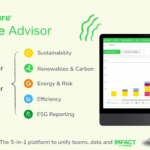
Schneider Electric Resource Advisor Plus (often written as Resource Advisor+) is built for that exact problem. It’s an AI-supported platform that brings energy, carbon (Scopes 1 to 3), supply chain data, and climate risk signals into one workflow, then helps turn that mess into actions you can track.
This guide explains what people actually do in the tool each week, how data becomes trusted results, what to ask in a demo, and how it differs from DCIM and older energy platforms.
What Resource Advisor Plus does day to day (beyond dashboards)
Resource Advisor+ builds on the long-running EcoStruxure Resource Advisor foundation, but it adds a broader sustainability scope and an AI layer to speed up analysis and follow-up. In practice, the weekly work looks less like “build a chart” and more like “close a loop.”
Most teams use it to keep four cycles moving:
- Data intake and cleanup: confirm utility bills, fix mapping issues (sites, meters, accounts), and lock reporting periods.
- Performance checks: compare sites, spot abnormal usage, and separate weather effects from operational problems.
- Emissions operations: generate Scope 1 and 2 results on schedule, then expand Scope 3 coverage without breaking the process.
- Project and program tracking: document energy projects, savings, and progress toward internal targets, with evidence that survives audits.
Schneider positioned Resource Advisor+ as an “AI-first” evolution of its advisory platform, with early coverage centered on carbon performance and supply chain workflows, alongside established energy data management capabilities. For background on the January 2026 launch framing, see the Resource Advisor+ announcement summary.
The main jobs it helps with: energy, emissions (Scopes 1 to 3), supply chain, and climate risk
Energy management starts with basic truth: which sites used what, when, and at what price. A typical example is tracking electricity use per site, then normalizing it by square footage or production output to spot underperformers.
Scope 1 and 2 emissions depend on clean activity data and controlled factors. For Scope 2, teams often need both location-based and market-based numbers, plus a clear record of which method was used for each report.
Scope 3 supply chain work is where most programs stall. Resource Advisor+ is designed to collect supplier emissions inputs, track who responded, and keep an audit trail for follow-ups. That matters because Scope 3 data is rarely “one and done.” It’s more like tuning an instrument; you improve coverage each cycle.
Climate risk becomes useful when it’s tied to locations that matter. For example, if a coastal distribution center faces higher flood exposure, that risk should connect to a capital plan, insurance review, or supplier reroute discussion, not just a slide in an ESG deck.
The goal across all four areas is the same: one source of truth that supports decisions, not just reporting.
Sera AI Agent, what it is and how it changes the workflow
Sera is the AI agent inside Resource Advisor+ that turns a request into an analysis, then into a short plan. Instead of exporting data to build your own logic, you ask for an outcome, for example, “Which sites drove last month’s spike?” or “What actions cut emissions fastest this quarter?” Sera routes that work through specialized analysis and return plain outputs:
- What’s happening (trend, anomaly, gap to target)
- Why it matters (cost, risk, reporting impact)
- What to do next (ranked actions, owners, timing)
- How to measure it (baseline, expected savings, verification plan)
That last point is the difference between “AI insight” and operational value. If you can’t measure it, finance won’t trust it, and operations won’t prioritize it.
How it works under the hood, from data intake to trusted results
Every analytics platform has the same failure mode: bad inputs create confident-looking outputs. Resource Advisor+ reduces that risk by forcing structure around data intake, review, and change control.
At a high level, the flow is simple. First, data comes in from bills, meters, systems, and suppliers. Next, the platform aligns it to common definitions (sites, time periods, units, categories). Then it runs checks, flags issues, and supports approvals. Finally, it produces reports, action lists, and project tracking that connect back to the original sources.
If you can’t answer “who approves this data,” you don’t have governance, you have hope.
Clear ownership matters. Someone needs to review bills, someone needs to control emissions factors and methodologies, and someone needs to manage supplier outreach and evidence.
Where the data comes from, and what “unified” really means
Most implementations pull from a mix of:
- Utility bills and invoices (electric, gas, water, waste)
- Interval meters and building systems (BMS, submeters)
- Facility records (site attributes, floor area, operating hours)
- Procurement and supplier submissions for Scope 3
- Spreadsheets that still run parts of the program
- Existing ESG reporting tools that require exports
“Unified” doesn’t mean everything becomes identical. It means the platform keeps consistent site lists, time windows, units, and categories, so totals match across reports. It also means you can trace an emissions figure back to the activity data and the factor used to calculate it.
If your metering layer needs improvement, pairing the platform with robust electrical visibility can help. For a practical look at enterprise meter and power quality monitoring, see Schneider Electric Power Monitoring Expert (PME).
How the platform finds issues and turns them into actions
Resource Advisor+ focuses on controls that prevent surprises and reduce manual hunting:
Bill validation catches invoice errors and mismatched rates before payments lock in. That’s direct savings, not “insight.”
Anomaly alerts highlight spikes, missing intervals, and drift from expected patterns. As a result, teams fix issues earlier, when root causes are still visible.
Site benchmarking shows which buildings or plants are off track against peers. That helps ops teams prioritize, because nobody has time to investigate every site every month.
Project tracking links actions to outcomes. Efficiency upgrades, control changes, or equipment replacements need baselines, expected savings, and verification steps. Otherwise, the “savings” live only in a slide.
Who should consider Resource Advisor Plus, and what to ask before buying
Resource Advisor+ fits best when energy and sustainability work spans many sites, several regions, or a complex supplier base. It’s also a strong fit when reports must stand up to audits, board review, or customer scrutiny.
Common stakeholders include energy managers, sustainability leads, procurement, finance, EHS, and operations. Each group cares about different outputs, so the buying process should start with shared outcomes, not features. Also, expect quote-based pricing that varies by scope, data sources, and modules.
Best-fit scenarios, and signs you might not need it yet
Best-fit signals usually look like this: high energy spend, multi-site operations, formal emissions targets, pressure to quantify Scope 3, and repeated requests for “one number everyone agrees on.”
On the other hand, some organizations won’t get value yet. If you have a tiny footprint, only a few bills, no supplier program, and no owner for data governance, a lighter utility tracker may be enough for now. Tools don’t fix ownership gaps.
Demo checklist: questions that uncover real value and total effort
Use the demo to uncover effort, not just screens:
- What’s the implementation timeline, and what work stays on our side?
- How do you onboard and validate utility bills and interval data?
- How do we manage Scopes 1 and 2 methodology choices, approvals, and audit logs?
- What does the Scope 3 supplier process look like (collection, reminders, evidence storage)?
- How is climate risk tied to our site list and material locations?
- How do alerts, approvals, and roles work across energy, carbon, and procurement?
- What exports and reporting formats do we need for ESG, finance, and customers?
- When Sera recommends an action, how does it explain assumptions and expected impact?
Ask for a pilot plan with success metrics, for example time saved in monthly close, bill error catch rate, emissions coverage percent, and supplier response rate.
Resource Advisor Plus vs EcoStruxure Resource Advisor and DCIM tools: what’s different
It’s easy to mix these categories because they all show energy charts. The difference is the operating target.
DCIM tools focus on data center infrastructure: power, cooling, space, assets, and uptime constraints. Resource Advisor+ targets enterprise-wide energy and sustainability operations, including supply chain and risk. EcoStruxure Resource Advisor (classic) sits closer to energy data management and reporting, while “Plus” extends the scope and adds AI-supported guidance.
Here’s a quick way to compare:
| Area | Resource Advisor+ | EcoStruxure Resource Advisor (classic) | DCIM tools |
|---|---|---|---|
| Primary focus | Enterprise energy, carbon, supply chain, risk | Energy and resource data management | Data center ops (power, cooling, assets) |
| AI-guided workflow | Yes, via Sera | Limited compared to Plus | Varies by vendor, often ops-focused |
| Scope 3 supplier coverage | Built in (module-based) | Typically lighter | Not the main goal |
What you gain with the “Plus” platform, and what stays the same
With “Plus,” you gain a control-center approach that reduces tool sprawl: broader sustainability coverage, AI-supported next steps, and better continuity between reporting and execution.
At the same time, the unglamorous parts still matter. Bill checks, budgets, benchmarking, alarms, and project tracking are the systems that keep programs honest month after month. If those basics are weak, AI won’t save the program, it’ll just summarize the confusion faster. For Schneider’s current framing of Sera and the platform’s scope, review the Resource Advisor+ platform overview.
Conclusion
If you need one place for energy, carbon, suppliers, and climate risk, and you want AI-supported next steps, Schneider Electric Resource Advisor Plus deserves a serious demo. If your main need is data center operations, or basic bill tracking for a small footprint, narrower tools can fit better.
Next, write down your top three outcomes (cost savings, emissions coverage, supplier Scope 3 progress), then take the demo checklist and test whether the platform can prove those results in a pilot.